Overview
Yara Fetch is a fast, lightweight system information display tool written entirely in pure Bash — inspired by fastfetch and neofetch. It prints a distro-specific ASCII logo alongside a neatly sectioned readout of your system, desktop, hardware, and network information — all from a single script with no compiled binaries required.
Yara Fetch is Version 2.0, released under the MIT License, and built and maintained by Saman Udayanga Wijesinghe as part of the Yara Utility Suite.
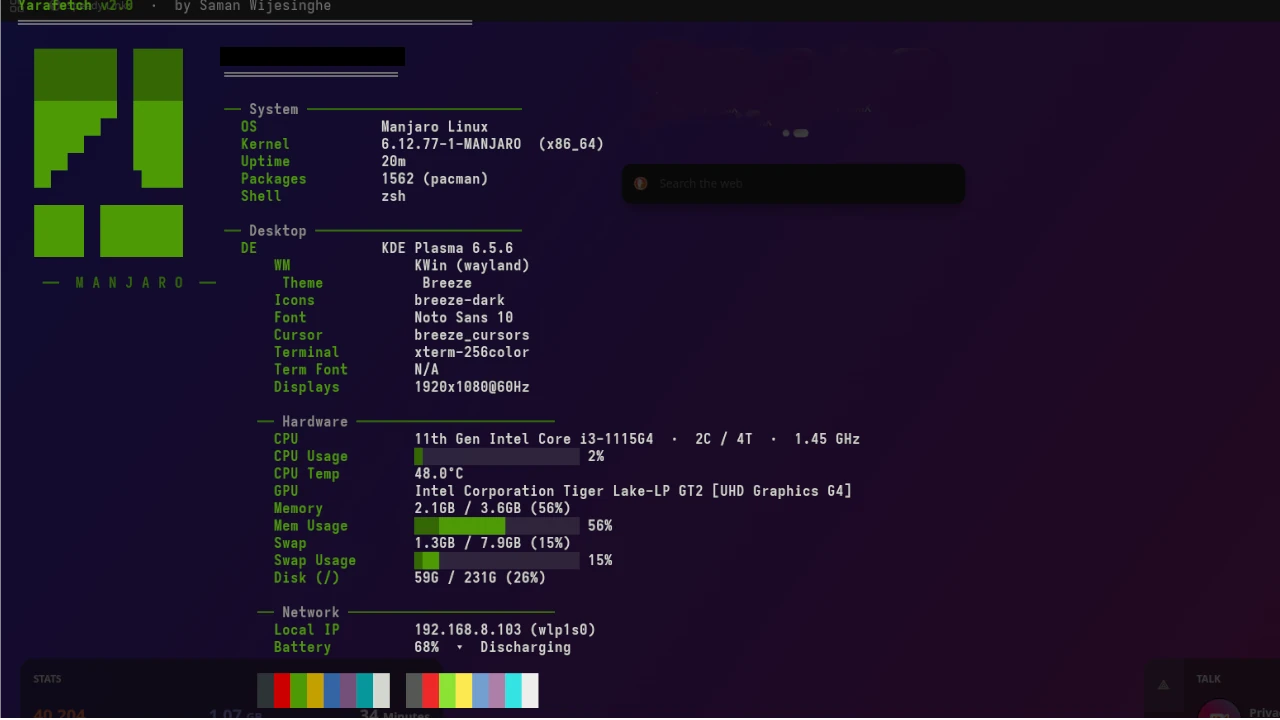
Preview
  Yarafetch v2.0  ·  by Saman Wijesinghe
  ═══════════════════════════════════════════════════════

           /\            mbc-saman@archlinux
          /  \           ═══════════════════
         /\   \
        /  \   \          ── System ──────────────────────────
       /    \   \           OS               Arch Linux
      /  /\  \   \          Kernel           6.19.11-arch1-1 (x86_64)
     /  /  \  \   \         Uptime           6h 51m
    /  /    \  \   \        Packages         1091 (pacman)
   /  / /\   \  \   \       Shell            bash 5.3.9
  /  / /  \   \  \   \
 /  /_/____\___\__\   \    ── Desktop ─────────────────────────
/__/__________________\__\   DE               KDE Plasma 6.6.4
                             WM               KWin (wayland)
  ──  A R C H  L I N U X  ──  Theme            Breeze
                             Icons            breeze-dark
                             Font             Noto Sans 10
                             Cursor           breeze_cursors
                             Terminal         konsole
                             Term Font        Hack Nerd Font 12
                             Displays         1920x1080@60Hz,1920x1080@60Hz

                            ── Hardware ────────────────────────
                             CPU              Intel Core i5-8250U  ·  4C / 8T  ·  2.50 GHz
                             CPU Usage        ████████░░░░░░░░░░░░ 42%
                             CPU Temp         57.0°C
                             GPU              Intel UHD Graphics 620
                             GPU 2            NVIDIA GeForce MX130
                             Memory           4.7GB / 7.7GB (60%)
                             Mem Usage        ████████████░░░░░░░░ 60%
                             Swap             551MB / 14GB (3%)
                             Disk (/)         42G / 119G (36%)

                            ── Network ─────────────────────────
                             Local IP         192.168.0.190 (wlan0)
                             Battery          100%  ✔  Full

                             ██ ██ ██ ██ ██ ██ ██ ██  ██ ██ ██ ██ ██ ██ ██ ██
                             ██ ██ ██ ██ ██ ██ ██ ██  ██ ██ ██ ██ ██ ██ ██ ██
Key Features
- Distro ASCII logos — per-distro logos with 3-shade gradient (dim → normal → bold) for 12 distributions and a generic fallback
- Sectioned layout — System, Desktop, Hardware, and Network in a clean columnar display
- Gradient progress bars — live CPU usage, memory, and swap bars
- 16-color terminal palette — 8 standard + 8 bright colors shown at the bottom of the output
- Auto-detection — detects package manager, display server (X11/Wayland), DE, and WM automatically
- No external dependencies — only standard Linux tools:
bash,awk,sed,ps,ip,df,lspci - Optional
sensorssupport — CPU temperature via lm_sensors or hwmon fallback
Displayed Information
System
| Field | Description |
|---|---|
| OS | Distribution name and version |
| Kernel | Linux kernel version and architecture |
| Uptime | Time since last boot (days, hours, minutes) |
| Packages | Installed package count with package manager name |
| Shell | Shell name and version |
Desktop
| Field | Description |
|---|---|
| DE | Desktop environment and version (Plasma, GNOME, Xfce…) |
| WM | Window manager and session type (X11/Wayland) |
| Theme | GTK or KDE color scheme |
| Icons | Icon theme name |
| Font | System UI font |
| Cursor | Cursor theme |
| Terminal | Detected terminal emulator |
| Term Font | Terminal font (from Konsole, Alacritty, Kitty configs) |
| Displays | Active monitor resolutions and refresh rates |
Hardware
| Field | Description |
|---|---|
| CPU | Model, core/thread count, average frequency |
| CPU Usage | Live usage % with gradient bar (sampled over 250 ms) |
| CPU Temp | Package temperature from sensors or hwmon |
| GPU | Primary GPU (and GPU 2 if a second card is present) |
| Memory | Used / total RAM with percentage and gradient bar |
| Swap | Used / total swap (bar shown only when swap is in use) |
| Disk (/) | Used / total for the root filesystem |
Network
| Field | Description |
|---|---|
| Local IP | Primary LAN IP address and network interface |
| Battery | Charge percentage and status (Full / Charging / Discharging) |
Supported Distributions
Yara Fetch ships a custom ASCII logo for these distributions. All others fall back to a generic Yarafetch box logo.
| Distribution | Logo Color |
|---|---|
| Arch Linux | Cyan |
| Ubuntu | Yellow |
| Debian | Red |
| Fedora | Blue |
| Manjaro | Green |
| NixOS | Blue |
| Void Linux | Green |
| openSUSE | Green |
| Gentoo | Magenta |
| Linux Mint | Green |
| Pop!_OS | Cyan |
| EndeavourOS | Magenta |
Requirements
Required
| Tool | Purpose |
|---|---|
| bash >= 4.0 | Script runtime |
| awk | Text processing |
| sed | Text processing |
| ps | Process detection |
| ip | Network info |
| df | Disk usage |
| lspci | GPU detection |
| numfmt | Human-readable sizes (part of coreutils) |
Optional (enhances output)
| Tool | Purpose | Install |
|---|---|---|
| sensors | CPU temperature | lm_sensors |
| kscreen-doctor | Wayland display resolution (KDE) | kscreen |
| wlr-randr | Wayland display resolution (wlroots) | wlr-randr |
| xrandr | X11 display resolution | xorg-xrandr |
| xprop | X11 WM detection | xorg-xprop |
Install optional tools
Arch Linux
sudo pacman -S lm_sensors kscreen xorg-xrandr xorg-xprop
Ubuntu / Debian
sudo apt install lm-sensors x11-xserver-utils x11-utils
Fedora
sudo dnf install lm_sensors xrandr xprop
Installation
Quick run (no install)
bash yarafetch.sh
Install system-wide
sudo ./install.sh
This copies yarafetch.sh to /usr/local/bin/yarafetch so you can run it from anywhere:
yarafetch
Manual install
chmod +x yarafetch.sh
sudo cp yarafetch.sh /usr/local/bin/yarafetch
Uninstall
sudo rm /usr/local/bin/yarafetch
Usage
yarafetch
No arguments or flags needed — just run it and it will auto-detect everything.
Get Yara Fetch
| Resource | Link |
|---|---|
| GitLab Repository | gitlab.com/samanscode/yara-fetch |
| Download ZIP | yara-fetch-main.zip |
The Yara Utility Suite
Yara Fetch is part of the Yara Utility Suite — a collection of lightweight, terminal-focused tools built and maintained by Saman Udayanga Wijesinghe.
License
Yara Fetch is released under the MIT License. © 2025 Saman Udayanga Wijesinghe